


Key Takeaways
-
1Onboarding builds trust: The first interaction through the first visit shapes patient trust, engagement with care plans, and the likelihood of returning for future appointments.
-
2Most issues administrative: Paperwork repetition, unclear instructions, and disconnected systems frustrate patients and increase no-shows during the onboarding phase.
-
3Digital pre-registration helps: Collecting demographics, history, and insurance details before arrival speeds up check-in and improves clinic workflow.
-
4Personalize onboarding flow: New vs returning, chronic vs acute, and tech-savvy vs assisted patients require different onboarding experiences.
-
5Measurement drives improvement: Tracking form completion, no-shows, portal use, and intake time turns onboarding into a continuously improving system.
The first interaction a patient has with a healthcare organization sets the tone for the entire relationship. From the moment a patient tries to book an appointment to the way they complete forms, receive instructions, and experience their first visit, onboarding shapes trust, confidence, and long-term engagement.
In many clinics, however, patient onboarding is still slow, manual, and fragmented. Paperwork is repetitive, instructions are unclear, and staff spend valuable time chasing forms instead of supporting care. This is where modern Patient Onboarding, especially automated and digital onboarding, becomes essential.
This guide explains what patient onboarding really is, why it matters, and how healthcare organizations can design and automate an end-to-end patient onboarding process that improves efficiency, reduces friction, and creates a seamless patient experience from day one.
What Is Patient Onboarding?

Patient onboarding is the structured process of welcoming, registering, preparing, and orienting a new patient before and during their first interaction with a healthcare provider. It begins at first contact and continues through the initial visit and early follow-up.
A well-designed patient onboarding process has four core goals:
- Gather accurate information such as patient demographics, medical history, and insurance eligibility
- Set clear expectations around appointments, care steps, and communication
- Build trust and confidence by reducing anxiety and confusion
- Prepare patients for care so visits start on time and clinicians have the information they need
Modern patient onboarding goes beyond paperwork. It is a carefully designed experience that connects administrative, clinical, and educational elements into a single, coherent journey.
Understanding the Patient Onboarding Process
To optimize patient onboarding, it helps to understand its main stages and components.
Main Stages of Patient Onboarding
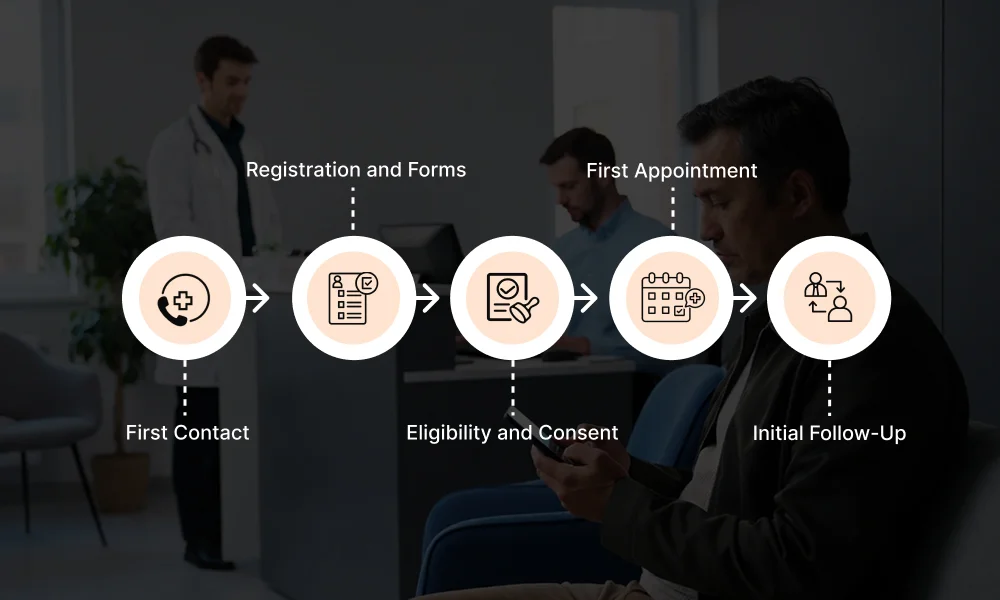
Most onboarding workflows include the following stages:
1. First Contact
This may occur through a phone call, website, referral, or online booking.
- Patient action: Requests information or schedules an appointment
- Clinic action: Provides clear instructions, availability, and next steps
2. Registration and Forms
This stage includes new patient intake and information collection.
- Patient action: Completes demographics, medical history, and pre-visit forms
- Clinic action: Collects and validates data for EHR entry
3. Eligibility and Consent
Before care begins, administrative requirements must be completed.
- Patient action: Submits insurance details and consent disclosures
- Clinic action: Verifies insurance eligibility and confirms compliance
4. First Appointment
The patient arrives for care.
- Patient action: Checks in, meets the care team, receives treatment
- Clinic action: Uses onboarding data to support efficient care delivery
5. Initial Follow-Up
Onboarding continues after the visit.
- Patient action: Reviews instructions, accesses results, schedules follow-ups
- Clinic action: Provides care navigation support and next steps
Together, these stages form the new patient onboarding journey.
Core Components of Patient Onboarding
Patient onboarding includes several interconnected components:
- Administrative: registration and check-in, insurance eligibility, consent disclosures
- Clinical: medical history, reason for visit, care coordination
- Educational: patient education materials, visit preparation instructions
- Relational: tone of communication, new patient welcome, trust-building
When these components are disconnected, onboarding feels fragmented. When aligned, they create a seamless patient onboarding experience in healthcare.
Step-by-Step Patient Onboarding Automation Guide
Knowing why to automate patient onboarding is only half the equation. This section explains what to automate first, second, and third, how to configure the triggers for each step, and what the live workflow looks like for both staff and patients in practice.
What to Automate First: New Patient Intake Forms
The single highest-ROI automation in onboarding is digital pre-visit forms sent immediately after booking. This is where the most manual staff time is lost and where patient frustration starts.
Why this comes first:
Every new patient needs forms. Every form currently filled out at the front desk adds 8–12 minutes to check-in, creates transcription errors, and delays the clinical team. Solving this one step eliminates a bottleneck that affects 100% of your new patients.
What it includes:
- Demographics and contact information
- Medical history and current medications
- Reason for visit
- Insurance details
- HIPAA consent and practice consent forms
How to configure the trigger:
The trigger is appointment creation. It begins the moment a new patient books, whether online, by phone, or through a referral intake.
In your scheduling or EHR system, set up the following rule:
Most EHR platforms (athenahealth, Kareo, DrChrono, eClinicalWorks) have a built-in “patient forms” module or integrate with a form tool like Phreesia, Tebra, or IntakeQ.
If yours does not, a low-code automation tool like Zapier or Make can connect your scheduling system to a form platform and trigger the send automatically.
Completion reminder sub-trigger:
What this looks like in practice:
A patient books online Monday at 2 pm for a Thursday 10 am appointment. At 2:01 pm, they receive a text and email with a secure link. They complete the form from their phone Tuesday evening.
By Wednesday morning, their chart is pre-populated in the EHR. On Thursday, the front desk sees a green “forms complete” status — no clipboard, no manual entry, no delays.
What to Automate Second: Insurance Eligibility Verification
Once intake forms are flowing automatically, the next bottleneck is insurance verification — a step that staff currently do manually, often the morning of the appointment, under time pressure, with no safety net if something is wrong.
Why this comes second:
Eligibility errors discovered on the day of the visit create patient conflict, delayed care, and unbillable time. Running verification automatically 48–72 hours in advance gives your team time to resolve issues before they become problems.
What it includes:
- Real-time eligibility check against payer records
- Confirmation of active coverage, co-pay, and deductible status
- Flag for inactive coverage, plan mismatches, or missing information
- Automated patient notification if an issue is found
How to configure the trigger:
The trigger is time before appointment — typically 72 hours out, with a fallback 24 hours before.
Most modern EHR systems support automated eligibility batch checks. If yours requires manual triggers, tools like Waystar or Availity can be configured to run on a schedule and push results back into your system.
What this looks like in practice:
Seventy-two hours before a Tuesday appointment, the system automatically pings the payer. The response comes back in under two minutes: the patient’s plan changed employers and the old policy is inactive.
A task is created for your billing coordinator, and a text goes to the patient. They call in Tuesday morning, provide the new insurance card, and the visit happens on time.
Without automation, this issue would surface at the front desk while the patient is standing there, creating a 20-minute delay and a frustrated patient on their first visit.
What to Automate Third: Appointment Reminders and Pre-Visit Instructions
With intake forms complete and insurance verified, the third automation layer ensures patients actually show up — prepared, on time, and with the right expectations.
Why this comes third: No-shows cost U.S. medical practices an estimated $150 billion per year. More importantly, patients who don’t know what to prepare — fasting requirements, what to bring, where to park, what the visit will involve — arrive late, underprepared, or anxious. A structured reminder sequence solves all of this.
What it includes:
- Appointment confirmation immediately after booking
- Reminder with preparation instructions 72 hours before
- Day-before reminder with check-in instructions
- Day-of reminder with location details and a one-tap confirm/cancel option
- Post-visit follow-up with next steps
How to configure the triggers:
This is a time-based sequence tied to appointment date. Configure each message as a separate automated step:
| Trigger | Channel | Message Purpose |
|---|---|---|
| Immediately after booking | Email + SMS | Confirmation + intake form link |
| 72 hours before appointment | SMS | Preparation instructions (fasting, documents to bring) |
| 24 hours before appointment | SMS + Email | Reminder + confirm/cancel option |
| 2 hours before appointment | SMS | Location, parking, and check-in instructions |
| 2 hours after appointment | SMS | Post-visit summary + follow-up instructions |
Configure each message using your patient communication platform (Klara, Luma Health, NexHealth, or your EHR’s messaging module). Most allow you to set up these sequences once as a “campaign” or “workflow” that fires automatically for every new patient without any staff action.
Preparation instructions should be specific, not generic.
Rather than “please bring your insurance card,” write: “Please bring your insurance card, a photo ID, and a list of your current medications. If your visit includes a blood draw, please fast for 8 hours beforehand.”
Tailor the template to appointment type so a routine check-up, a specialist consult, and a pre-surgical visit each get relevant instructions.
The confirm/cancel option matters.
A two-tap “Confirm” or “Need to reschedule” link in the 24-hour reminder reduces no-shows dramatically because it removes friction from cancelling in advance. When a patient cancels 24 hours out instead of simply not showing up, you have time to fill the slot.
What this looks like in practice:
A new patient books a 9 AM appointment. They receive a confirmation text at 9 AM with their intake form. On Thursday evening, they receive a reminder with preparation instructions and realize they need to fast, which they had not known before.
Friday morning they receive a “See you tomorrow” message with a one-tap confirm button and the office address. They click “Confirm.”
Saturday morning they get a parking note 2 hours before the visit. They arrive on time, forms are done, insurance is verified, and the provider walks in with a pre-populated chart. The visit starts on schedule.
Full Workflow in Practice: What Your Staff Actually Does
Once these three automations are configured, the manual onboarding workload shrinks dramatically. Here is what the workflow looks like across the team:
Front desk staff — before the visit:
- Reviews a daily “readiness dashboard” showing which patients have completed forms, confirmed, and passed insurance verification
- Contacts only the flagged exceptions (incomplete forms, insurance issues, unconfirmed appointments)
- No longer prints, hands out, or re-enters paperwork
Billing/admin — 72 hours out:
- Reviews any failed eligibility checks surfaced automatically
- Makes targeted outreach calls only to patients with flagged coverage issues
- No longer runs manual batch verification the morning of appointments
Clinical staff — day of visit:
- Opens the chart to find history, medications, and reason for visit already populated
- Spends the visit on care, not on recollecting information the patient already submitted
- Reviews preparation confirmation (fasting compliance, documents) flagged by the intake form
What changes for patients:
- Receive clear, step-by-step communication from the moment they book
- Complete paperwork on their own time, not in a waiting room
- Arrive knowing exactly what to expect, where to go, and what to bring
- Feel that the practice is organized and cares about their time
Key Challenges in Patient Onboarding
Every practice hits friction in onboarding. The difference between practices that fix it and those that don’t is knowing which solution matches which problem. Here are the six most common onboarding challenges and the specific steps to address each one.

Many healthcare organizations struggle with patient onboarding because of outdated processes and disconnected systems. Common challenges include:
Challenge 1: Long and Repetitive Paperwork
What’s happening: Patients fill out the same information such as name, date of birth, insurance, and medical history multiple times across different forms. Staff then re-enter that data manually into the EHR. Both sides waste time on information that already exists.
The consequence: Check-in runs long, patients arrive stressed from completing forms in the waiting room, and transcription errors create downstream billing and clinical problems.
The fix: Start by laying every form in your intake packet side by side and marking every field that appears more than once. In most practices, the majority of fields are duplicated. Eliminate the duplicates first before changing any technology.
Then redesign intake around a single collection point: one form, one entry, and one pass into the chart. Whether that form is digital or paper matters less than whether the information flows forward without being handled again.
The test is simple. If a staff member is typing information that a patient already wrote down, that step needs to be redesigned.
Challenge 2: Confusing or Inconsistent Instructions
What’s happening: Different staff members give different instructions. One receptionist tells a patient to arrive 15 minutes early; another says 10. One visit type requires fasting; patients aren’t told until they arrive. Instructions change depending on who answers the phone.
The consequence: Patients arrive underprepared, late, or at the wrong location. Visits get delayed or have to be rescheduled. Patient trust erodes before care even starts.
The fix: Instructions should never live in a staff member’s memory. For each appointment type your practice sees, write a single preparation document — one page, plain language, reviewed and approved by your clinical lead.
What to bring, when to arrive, whether fasting is required, what the visit will involve. Once approved, that document becomes the only source of patient instructions for that appointment type.
It goes out with every confirmation. No variation, no version drift, no dependence on who happens to answer the phone that day.
Challenge 3: Patients Being Asked the Same Questions Multiple Times
What’s happening: A patient gives their medical history to the intake coordinator, repeats it to the nurse, and answers the same questions again with the provider. Insurance information is taken at booking and asked again at check-in.
The consequence: Patients feel the practice is disorganized. Time is wasted in every step of the visit. Staff morale suffers from doing redundant work.
The fix: This is not a technology problem. It is a visibility problem. The information exists, but it is not reaching the next person before they ask for it again.
The solution is a simple internal handoff practice. Intake information should be reviewed by the nurse before the visit begins, not during it. The provider should review the chart before entering the room, not while sitting in front of the patient.
This requires a protocol with a defined point in the day when charts are reviewed and flagged, not a software purchase. When staff have the information in advance, they confirm and clarify rather than collect it from scratch.
Challenge 4: Technology Barriers for Less Digital-Savvy Patients
What’s happening: Digital intake forms work well for younger, tech-comfortable patients. Older patients, those with limited English proficiency, or those without reliable smartphone access struggle to complete them — or don’t complete them at all, leaving charts empty on the day of the visit.
The consequence: Practices either lose the efficiency gains of digital forms or create a two-tier experience where some patients arrive prepared and others don’t.
The fix: Design intake with two tracks from the start. The first track is self service, where a form is sent ahead of the appointment and patients complete it on their own time.
The second track is assisted, which is a short scripted call made by a staff member when a form has not been completed 48 hours before the appointment. During the call, the staff member walks the patient through each question verbally.
Most of these calls take under ten minutes, and the staff member enters the responses directly during the call. Both tracks produce the same result, which is a completed intake record in the chart before the visit.
No patient is excluded, and no chart arrives empty because the process assumed everyone would complete the form on their own.
Challenge 5: Poor Communication Between Front Desk, Clinical Staff, and Providers
What’s happening: Information collected at one stage of onboarding does not reliably reach the next. The front desk knows the insurance situation. The nurse knows the medical history. The provider often knows neither until the visit is already underway.
The consequence: Providers spend the opening minutes of a visit catching up on context they should have had before entering the room. Relevant history gets missed. Decisions get made on incomplete information.
The fix: Handoffs between roles need to be written, not verbal, and they should travel with the patient through every stage of the visit.
A one-page internal brief, not a clinical document but a structured handoff record, can capture the key flags from intake. These include the primary concern, relevant history, insurance status, and any open issues at check-in.
The front desk contributes the administrative fields. The nurse adds clinical flags after reviewing the intake information. The provider reads the brief before entering the room. This is a protocol question, not a systems question.
It can be implemented with a printed template and a staff agreement about when it should be completed. Information that currently exists in different people’s heads moves onto a single shared record instead.
Challenge 6: Manual Workflows Creating High Administrative Burden
What’s happening: Staff perform the same procedural tasks for every new patient — printing forms, waiting for completion, scanning documents, calling payers, sending reminders individually. These tasks are identical every time, but they consume the majority of the front desk’s morning.
The consequence: Staff time is spent on repetitive procedural work rather than on patient interaction and exception handling. Under time pressure, errors increase. Experienced staff disengage from work that offers no variety or judgment.
The fix: Draw a line through your current intake workflow between tasks that are identical every time and tasks that genuinely require judgment. Sending a form, verifying insurance, sending a reminder, and delivering preparation instructions are identical every time.
Resolving an insurance dispute, supporting a patient with questions, and managing a complex rescheduling require a person.
The first category should be handled by a written protocol with assigned ownership and fixed timing. Forms go out at booking, eligibility is checked two days before, and reminders go out the day before.
Whether that protocol is executed by a scheduled system action or by a staff member following a checklist matters less than whether it happens consistently at the right time every time. Structural reliability, not additional headcount, is what eliminates the burden.
These challenges have real consequences:
- Higher no-show rates and late arrivals
- Delays in care and longer visit times
- Increased patient anxiety and frustration
- Higher administrative workload and staff burnout
Optimizing the patient onboarding workflow helps eliminate these issues by streamlining steps and improving clarity.
How to Build Trust and Confidence from Day One
Trust starts before the first visit. A patient who feels welcomed, informed, and supported is more likely to show up prepared and engaged.
Key elements of trust-building onboarding include:
- Warm, clear communication from the first interaction
- Simple instructions written in plain language
- Quick responses to questions or concerns
- A consistent tone across all patient onboarding touchpoints
Small details matter. A clear confirmation message, a friendly reminder, or a short explanation of what to expect can significantly reduce anxiety and improve the first visit experience.
How to Simplify Administrative Procedures
Administrative complexity is one of the biggest barriers to efficient onboarding.
Reducing Paperwork and Manual Entry
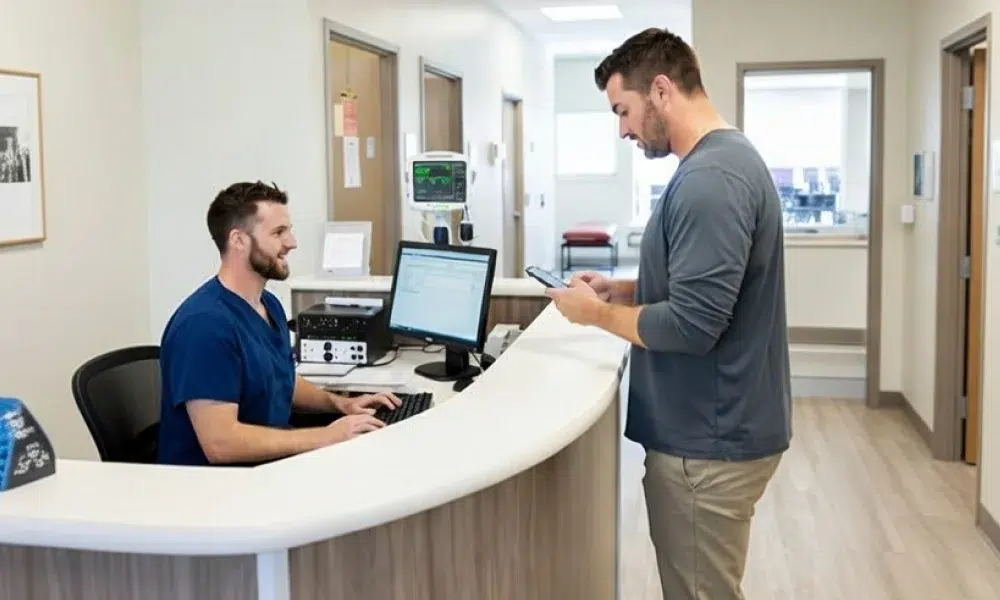
Automated onboarding allows patients to complete pre-visit forms digitally, reducing repetitive data entry. Information such as patient demographics, medical history, and insurance details should be captured once and reused across systems.
Connecting Onboarding to EHR/EMR
When onboarding data flows directly into the EHR or EMR, staff no longer need to re-enter information. This improves accuracy and saves time during registration and check-in.
Improving Scheduling and Reminders
Automation supports smoother appointment scheduling, confirmations, and reminders. This reduces no-shows and ensures patients know exactly what to expect.
Simplifying administration is a key step to optimize patient onboarding across all touchpoints.
Benefits of a Digital Onboarding Process
Digital patient onboarding replaces paper-based workflows with secure, mobile-friendly tools that patients can complete at their convenience.
Benefits for Patients
- Faster check-in and shorter wait times
- Ability to complete forms anytime, anywhere
- Clear instructions and fewer surprises
- A more modern and professional first impression
Benefits for Staff
- Fewer errors and incomplete forms
- Less time spent on manual intake
- Better data quality before the visit
- Reduced stress and administrative burden
Benefits for Operations
- Improved clinic flow and on-time starts
- Lower no-show rates
- Better utilization of staff and exam rooms
Digital patient onboarding optimization creates value for everyone involved.
Enhancing Coordination and Continuity of Care
Effective onboarding ensures the right information reaches the right people at the right time.
Key coordination benefits include:
- Clinicians receive medical history and visit context before the appointment
- Nurses and support staff align on patient needs and preparation
- Front desk teams avoid last-minute issues at check-in
Automated onboarding supports smoother transitions from the first visit to follow-up care, referrals, or additional services. This continuity strengthens both care quality and patient confidence.
Personalizing the Patient Onboarding Experience
Not all patients have the same needs, and onboarding should reflect that.
Segmenting Patients
Onboarding flows can be adjusted for:
- New vs returning patients
- Chronic care vs acute visits
- Younger, tech-savvy patients vs those who prefer assisted support
Tailoring Communication
Personalized reminders, instructions, and messages help patients feel understood rather than processed.
Using Feedback Early
Early onboarding feedback helps refine scripts, messaging, and steps, improving the experience over time.
Personalization is central to patient onboarding design and improvement.
Educating and Empowering Patients Early

Onboarding is an ideal time to educate patients and encourage engagement.
Effective strategies include:
- Providing pre-visit instructions and FAQs
- Sharing basic educational content related to the visit
- Explaining what will happen during the first appointment
Encouraging patient portal adoption early helps patients manage appointments, messages, and results. This empowers patients and reduces inbound calls to staff.
Ensuring Privacy and Data Security
Trust depends on protecting patient information.
During both digital and in-person onboarding, organizations must ensure:
- Secure handling of patient demographics and medical history
- Protection of insurance and consent information
- Controlled access to patient data
Digital onboarding tools should align with healthcare privacy regulations and follow best practices for data security. Clear communication about data protection also reassures patients.
Training and Empowering Staff
Even the best onboarding tools fail without well-trained staff.
Why Staff Training Matters
Staff shape the patient’s perception of care. Empathy, clarity, and confidence make onboarding smoother and more human.
Practical Supports for Staff

- Clear scripts for patient induction and explanations
- Checklists to ensure steps are completed consistently
- Defined patient onboarding workflows
- Training on digital tools and systems
Empowered staff are essential to improving the patient onboarding experience.
How to Measure and Improve the Onboarding Experience
Measurement turns onboarding from a one-time setup into a continuous improvement process.
Key KPIs to Track
- Form completion time
- First-visit no-show rate
- Patient portal sign-ups
- Patient satisfaction with first visit
- Staff time spent on intake
Using Feedback
Onboarding feedback from surveys, comments, and staff input highlights friction points and opportunities for improvement.
Continuous Improvement
Use data to test small changes, refine workflows, and standardize what works. This approach supports long-term success in automated patient onboarding.
Conclusion
Patient onboarding is more than registration, it is the foundation of the patient relationship. A modern, automated patient onboarding process improves efficiency, builds trust, reduces staff workload, and creates a seamless first visit experience.
By simplifying administrative steps, leveraging digital tools, personalizing communication, and measuring performance, healthcare organizations can optimize patient onboarding and set patients up for better care from day one.
A simple place to start is this: identify one onboarding bottleneck and pilot one digital change to remove it. Small improvements early in the journey create lasting impact for patients, staff, and operations.
FAQs
What is patient onboarding in healthcare?
Patient onboarding is the process of registering, preparing, and guiding new patients from first contact through their first visit and early follow-up.
Why is automating the patient onboarding process important?
Automation reduces paperwork, saves staff time, improves data accuracy, and creates a smoother experience for patients.
What are common challenges in patient onboarding?
Common challenges include long forms, repeated data entry, unclear instructions, poor communication, and manual workflows.
Can small clinics benefit from digital patient onboarding?
Yes. Digital onboarding helps small clinics reduce administrative workload, improve patient experience, and lower no-show rates.
How do you measure the success of patient onboarding?
Success is measured using KPIs such as form completion time, no-show rates, patient satisfaction, portal adoption, and staff time spent on intake.